“Seven layers of network communication - The blueprint for how data travels across networks”
Why do we need a communication model?
The OSI model provides a standardized framework that enables different network systems to communicate effectively, regardless of their underlying technology or vendor.
Agnostic Applications
- Technology Independence: Applications work across different network mediums without modification
- Universal Compatibility: Same application runs on WiFi, Ethernet, LTE, fiber, or satellite connections
- Developer Simplification: Developers focus on application logic, not network implementation details
- Example: A web browser works identically whether connected via cable, WiFi, or mobile data
Network Equipment Management
- Standardized Interfaces: Equipment from different vendors can interoperate
- Modular Upgrades: Upgrade individual network components without replacing entire infrastructure
- Troubleshooting: Systematic approach to diagnosing network issues layer by layer
- Example: Replace a Layer 2 switch without affecting Layer 3 routing or Layer 7 applications
Decoupled Innovation
- Layer Independence: Innovations in one layer don’t require changes in others
- Parallel Development: Different teams can work on different layers simultaneously
- Backward Compatibility: New protocols can coexist with existing ones
- Example: HTTP/3 (Layer 7) innovation doesn’t require changes to Ethernet (Layer 2)
What is the OSI Model?
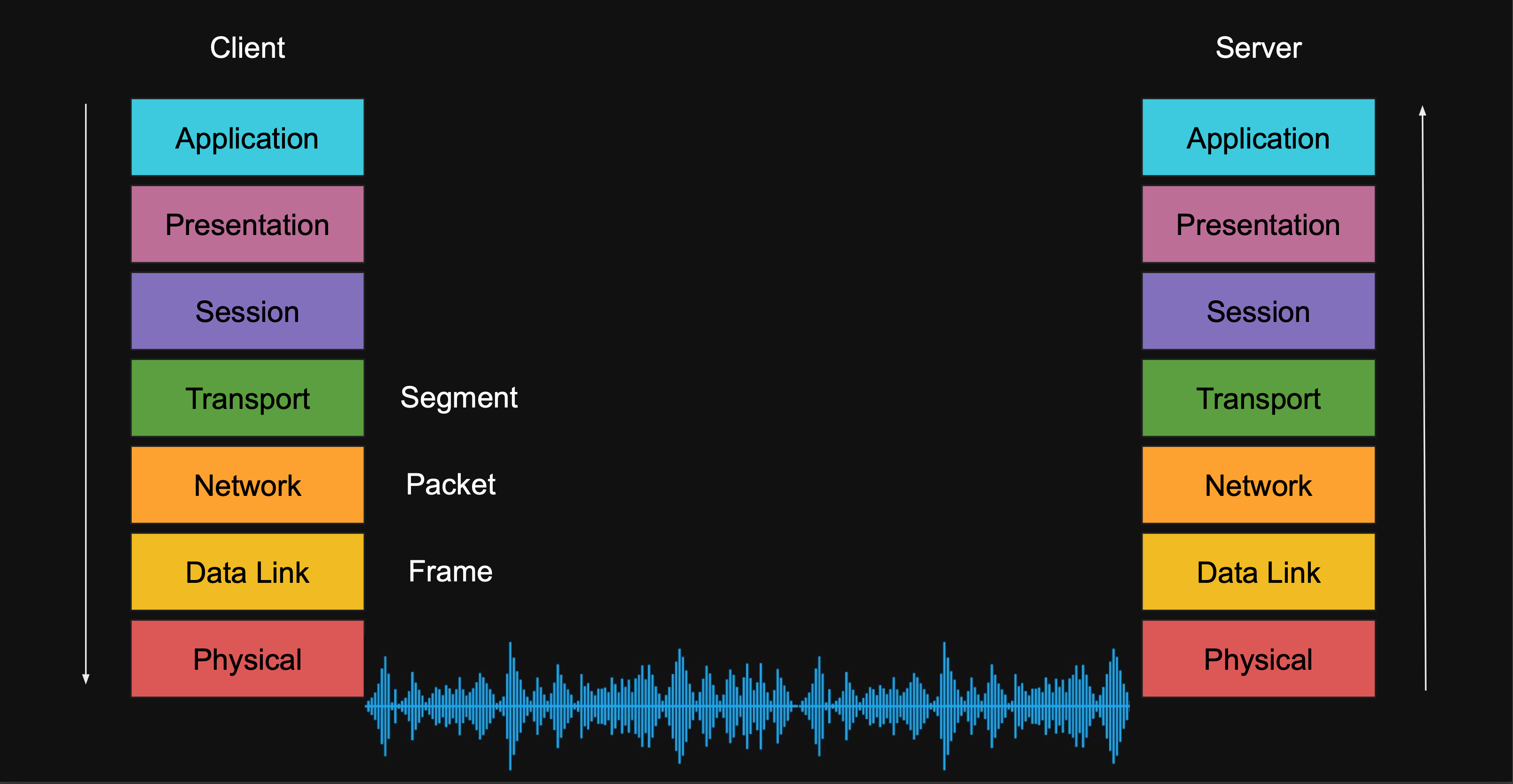
The OSI model divides network communication into seven distinct layers, each with specific responsibilities and protocols.
Layer 7 - Application Layer
- Purpose: End-user applications and network services
- Protocols: HTTP, HTTPS, FTP, SMTP, DNS, SSH, gRPC
- Function: Provides network services directly to applications
- Example: Web browser requesting a webpage via HTTP
Layer 6 - Presentation Layer
- Purpose: Data formatting, encryption, compression
- Functions: Encoding/decoding, serialization, SSL/TLS encryption
- Formats: JSON, XML, Protocol Buffers, JPEG, ASCII
- Example: Converting data to JSON format, SSL encryption
Layer 5 - Session Layer
- Purpose: Session management and connection control
- Functions: Establishing, maintaining, terminating connections
- Protocols: NetBIOS, RPC, PPTP, L2TP
- Example: Database connection pooling, video call session management
Layer 4 - Transport Layer
- Purpose: End-to-end data delivery and error recovery
- Protocols: TCP (reliable), UDP (fast), SCTP
- Functions: Segmentation, flow control, error detection
- Example: TCP ensuring all website data arrives correctly
Layer 3 - Network Layer
- Purpose: Routing and logical addressing
- Protocols: IPv4, IPv6, ICMP, OSPF, BGP
- Functions: Path determination, packet forwarding
- Example: Router determining best path to destination IP
Layer 2 - Data Link Layer
- Purpose: Node-to-node delivery and error detection
- Protocols: Ethernet, Wi-Fi (802.11), PPP, Frame Relay
- Functions: Framing, MAC addressing, error detection
- Example: Ethernet switch forwarding frames between computers
Layer 1 - Physical Layer
- Purpose: Transmission of raw bits over physical medium
- Medium: Copper cables, fiber optic, radio waves, infrared
- Functions: Electrical signaling, connector specifications
- Example: Converting digital data to electrical signals on network cable
Network Device Classifications
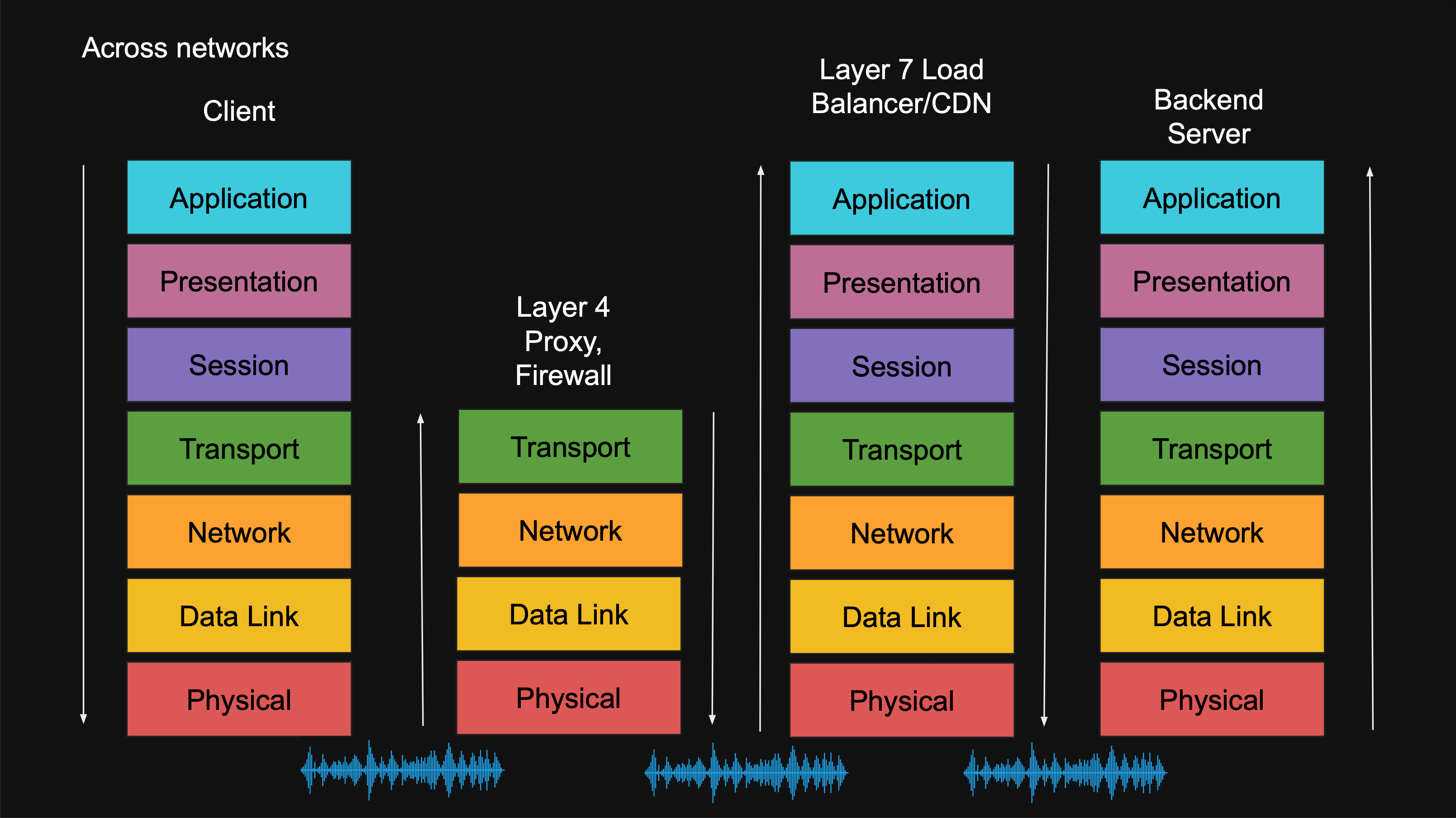
Understanding which layer network devices operate at helps in network design and troubleshooting.
Layer 2 Devices - Data Link Layer
- Network Switch: Forwards frames based on MAC addresses
- Function: Creates separate collision domains
- Use Case: Connecting devices within a local network
- Example: Office switch connecting computers, printers, servers
Layer 3 Devices - Network Layer
- Router: Routes packets between different networks using IP addresses
- Function: Connects different network segments
- Use Case: Home router connecting LAN to internet
- Example: ISP routers directing traffic across the internet
- VPN Gateway: Creates secure tunnels between networks
- Function: Encrypts and routes traffic through secure channels
- Use Case: Remote access to corporate networks
Layer 4 Devices - Transport Layer
- Firewall: Filters traffic based on ports and connection states
- Function: Security control based on transport layer information
- Use Case: Blocking unauthorized connections
- Example: Allowing HTTP (port 80) but blocking FTP (port 21)
- Proxy Server: Intermediary for client requests
- Function: Forward requests and cache responses
- Use Case: Content filtering, performance optimization
Layer 7 Devices - Application Layer
- Load Balancer: Distributes application requests across multiple servers
- Function: Intelligent traffic distribution based on application data
- Use Case: Scaling web applications across multiple servers
- Example: Distributing HTTP requests based on URL paths
- CDN (Content Delivery Network): Caches and delivers web content
- Function: Geographically distributed content caching
- Use Case: Faster content delivery to global users
The Shortcomings of the OSI Model
While the OSI model provides excellent theoretical framework, practical implementation reveals several limitations.
Complexity Challenges
- Seven Layer Overhead: Too many layers can create confusion in real-world scenarios
- Layer Ambiguity: Some functions don’t clearly belong to a single layer
- Implementation Confusion: Difficult to determine exactly which layer handles specific functions
- Academic vs Practical: Theoretical perfection doesn’t always match real-world networking
Layer Boundary Issues
- Overlapping Responsibilities: Session and presentation layers often merge in practice
- Protocol Placement: Some protocols span multiple layers (e.g., TLS operates at layers 5-6)
- Modern Protocol Challenges: New protocols like QUIC don’t fit neatly into traditional layers
Practical Simplification Need
- Developer Perspective: Application developers rarely need to distinguish between layers 5, 6, and 7
- Network Administration: Most troubleshooting focuses on layers 1-4 and application layer
- Industry Adoption: Real-world implementations often consolidate upper layers
TCP/IP Model: The Practical Alternative
The TCP/IP model simplifies network communication into four practical layers that better reflect real-world implementations.
TCP/IP Layer Structure
-
Application Layer: Combines OSI layers 5, 6, and 7
- Protocols: HTTP, FTP, SMTP, DNS, SSH
- Function: All application-level communication and data formatting
- Benefit: Simpler for developers and network administrators
-
Transport Layer: Same as OSI Layer 4
- Protocols: TCP, UDP
- Function: End-to-end communication and reliability
- Unchanged: Direct mapping from OSI model
-
Internet Layer: Same as OSI Layer 3
- Protocols: IP, ICMP, ARP
- Function: Routing and logical addressing
- Focus: Packet delivery across networks
-
Network Access Layer: Combines OSI layers 1 and 2
- Protocols: Ethernet, Wi-Fi, PPP
- Function: Physical transmission and local network delivery
- Practical: Hardware and immediate network concerns
TCP/IP Model Advantages
- Simplified Understanding: Four layers are easier to comprehend and remember
- Real-World Alignment: Better matches actual protocol implementations
- Industry Standard: Widely adopted by network professionals and developers
- Practical Troubleshooting: More useful for actual network problem-solving
When to Use Each Model
- OSI Model: Academic study, detailed protocol analysis, vendor certifications
- TCP/IP Model: Practical networking, software development, real-world implementations
Conclusion
The OSI model serves as the fundamental framework for understanding network communication, providing a systematic approach to organizing the complex process of data transmission across networks. While its seven-layer structure offers comprehensive theoretical coverage, the practical TCP/IP model’s four-layer approach often proves more useful for real-world networking tasks.
Both models remain essential tools for network professionals: the OSI model for detailed protocol analysis and education, and the TCP/IP model for practical implementation and troubleshooting. Understanding both frameworks enables better network design decisions and more effective problem-solving in modern distributed systems.